

[Editor's Note] This material is designed for the ThePlato team to practice introducing Tiro to global clients in English, from the one-minute pitch to handling tough questions about competitors, security, and pricing.
Please read the summary below before class. It follows the flow of Tiro's official service deck (v2.0, July 2026), so feel free to borrow its wording when you speak. In class, your tutor will play a global client and ask you to explain, compare, and defend Tiro in your own words.
1. About Tiro
Tiro accurately records every conversation across an organization in real time. It then helps AI understand that organization and turns meetings straight into action.
To do this, Tiro connects six steps into one flow. In the Capture stage, conversations come in as input and are transcribed and translated live. In the Documents stage, the content is structured and turned into template documents. In the Activation stage, the results are shared with other tools, and the accumulated records can be searched and asked about at any time.
More than 300 organizations and 300,000 users now rely on [1] Tiro, from major conglomerate affiliates and leading startups to VCs, public institutions, and global enterprises. The customer renewal rate is over 90%.
2. Six Key Features
- First, captured in any environment.
Tiro runs on desktop (Mac and Windows), web, mobile (iOS and Android), and even Apple Watch, and one account keeps every note in sync [2]. It works for in-person meetings, video calls, and large events. When the internet connection is unstable, conversations are saved to the device first and synced automatically once the connection is back.
- Second, the accuracy that matters most.
Tiro delivers over 98% overall accuracy, even with office noise, café music, several people talking at once, or echo from a venue mic. When teams register company, product, and people names in the glossary, Tiro corrects similar-sounding words in context [3]. For example, "S and OP" is automatically corrected to "S&OP."
- Third, real-time interpretation in 15+ languages.
A transcript appears 0.5 seconds after someone speaks, and Tiro interprets more than 15 languages at the same speed. For large global conferences and seminars, Conference Mode shows live subtitles on the big screen.
- Fourth, documents built on your own templates.
The document is ready the moment the meeting ends. Teams decide what goes in each section, and Tiro pulls the meeting content into the formats they already use, such as interview evaluations, user interviews, medical charts, global sales calls, and legal consultations.
- Fifth, a direct connection to internal systems.
Structured minutes and action items are delivered right away. Tiro can send results to collaboration tools like Slack and Notion, push restructured records into an in-house CRM through a Webhook, or pass the context to external AI agents such as Claude via MCP.
- Sixth, meeting records that become organizational assets.
Tiro Wiki grows on its [4] own as meetings pile up [5], turning the people, projects, and concepts an organization uses into pages. With Ask Tiro, users ask questions in plain language and get answers based on the wiki and notes, along with the meeting the answer came from.
3. Why Teams Choose Tiro
Tiro's deck compares it with four widely used tools: ClovaNote, Daglo, Otter.ai, and Notion. Based on public information as ofJuly 2026, Tiro is the only one that fully supports all eight criteria below.
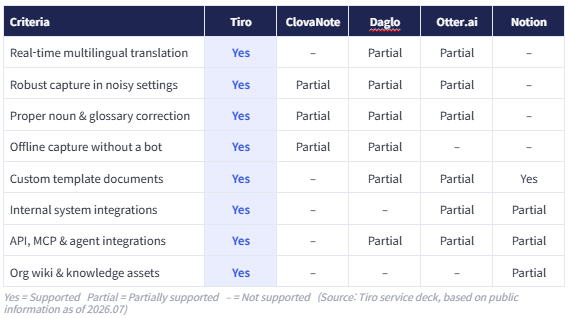
No other tool on the list fully supports real-time multilingual translation or an organizational wiki. Notion is strong in custom templates, but it does not offer real-time translation, noise-robust capture, or glossary correction. Otter.ai partly covers translation and integrations, but it cannot capture offline without a bot.
4. Security & Compliance
For companies adopting AI, security is often the first question. Tiro follows three principles.
- Audio is never retained. Recorded audio is irreversibly deleted right after transcription. Organizations that need to keep it can configure retention separately.
- Data is never used for AI training. Tiro has signed Zero Data Retention DPAs with all of its LLM and STT vendors.
- Records are encrypted and stored in isolation. Everything is encrypted with AES-256, keys are protected by KMS and HSM, and data is stored separately for each organization. It can also be fully isolated in a dedicated VPC.
Tiro is certified under ISO 27001:2022 and SOC 2 Type 1 and Type 2, and it aligns with [6] the NIST AI RMF, CSF, and CIS Controls frameworks. Enterprise security teams can use SSO through Okta and other identity providers, MFA, role-based access control, SCIM provisioning, PII masking, and audit logs. The service runs on AWS Seoul Multi-AZ with 24/7 monitoring and a 99.5% SLA. Detailed materials such as the Trust Document, certification reports, and DPA are shared after an NDA is signed.
5. Pricing
Team Plan: $29 per account per month. It includes unlimited usage, unlimited notes, all of Tiro's core features, and every collaboration feature such as team folders, sharing, and permissions. Volume discounts start at 50 accounts, and the price goes as low as [7] $18 per account for 200 accounts or more. Usage-based billing is also available, starting from $25 per 1,000 minutes.
Enterprise Plan: Custom quote. It follows the same pricing structure as the Team plan, with security options such as SSO, SCIM, and audit logs added. It can be deployed as SaaS, Private Cloud, or On-Premise, and customers get phased support from a free PoC to full rollout and expansion.
On either plan, annual billing comes with two months free.
6. Key Expressions for Your Pitch
Part A. Terms you will use often
- Real-time transcription: Turning speech into written text while people are still talking.
Example Tiro provides real-time transcription, so the transcript appears 0.5 seconds after you speak.
- Live interpretation: Translating spoken words into another language as the conversation happens.
Example With live interpretation, our Tokyo team can follow the Seoul meeting in Japanese.
- Custom vocabulary (glossary): A list of names and terms you register so the AI recognizes them correctly.
Example Add your product names to the custom vocabulary, and Tiro will stop misspelling them.
- Action items: Specific tasks agreed on in a meeting, usually with an owner and a deadline.
Example Once the meeting ends, the action items go straight to your Slack channel.
- Template document: A document built on a fixed format that a team uses again and again.
Example Your HR team can turn every interview into the same evaluation template document.
- Integration: A connection that lets two systems share data automatically.
Example Our CRM integration saves every client call without anyone copying and pasting.
- Zero Data Retention (ZDR): An agreement that a vendor will not store or reuse your data after processing it.
Example We have ZDR agreements with all of our AI vendors, so your data is never used for training.
- Proof of Concept (PoC): A small trial run to check whether a solution works before a full rollout.
Example We can start with a free PoC for one team and expand from there.
Part B. Phrases for handling client questions
- "What sets Tiro apart is ...": Use this to move from general features to your real difference.
Example What sets Tiro apart is that it works offline, without adding a bot to your meeting.
- "That's a fair question. Let me explain how we handle ...": Use this to accept a concern before answering it.
Example That's a fair question. Let me explain how we handle recorded audio.
- "Actually, for a team your size, ...": Use this to politely correct a wrong assumption.
Example Actually, for a team your size, the price comes down to $18 per account.
- "Let me walk you through how it works.": Use this before explaining a process step by step.
Example Let me walk you through how it works, from recording to the final document.